
What is CSS Specificity?
CSS Specificity is a set of rules and how a browser decides which CSS styles are applied to an element. This is based on matching rules made up of different CSS selectors. CSS Specificity becomes important as it could be a reason as to why you find that your CSS doesn’t always work as expected.
An Example
Here we have some HTML that has an unordered list with some list items. The first list item has a class of ‘first-item’.

Here we have our CSS, we want to target the list item with the class ‘first-item’ and change the color of the text but we have two selectors targeting the same element. Take a guess and see if you can figure out what color the text will be and why?

If you guessed blue, you are correct! This is because the specificity is higher in the second selector. To understand this, we will go through how CSS Specificity is calculated in the next section.
How To Calculate CSS Specificity
You might be wondering how do you actually calculate the Specificity?
Specificity is based on this order:
- Inline Styles
- ID’s
- Classes, attributes, and pseudo-classes
- Elements and Pseudo Elements
For the selector we wish to calculate, we go through it and +1 for each of the above categories. You can imagine the specificity visual looks like this:

Let’s calculate the examples above now: So first, we have just a simple class

Now then, using the order we showed above:

As a result, the specificity is 0,0,1,0 which you can merge into a number such as 0010 which can be looked at like 10.
Plugging this into a calculator we get the same result:

For the second example:

Using the logic above:

As a result, the specificity is 0,0,1,2 or 0012.
In this case, 0012 > 0010, and because of this the second CSS selector would be set and the text color will be blue.

Of course, the order in which you write does matter to some degree, for example, if we had both selectors of the same specificity:
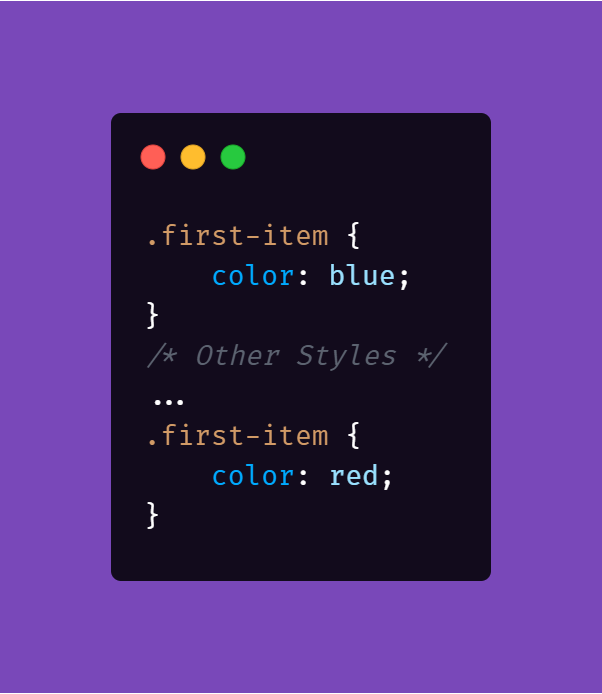
The selector written last will take effect and as a result, the color would be red because it was written later than the first one due to how CSS cascades styles.